Solution
Two buyers, one question, two different answers.
A data room with an AI assistant has a new way to leak. If the assistant can read every document in the room, a buyer who is not allowed to open the cap table can still ask what is in it. Permission-aware AI means the assistant answers each participant only from the documents that participant may open. This page shows how Sifrsys enforces that and what the evidence is.
Updated 5 Oct 2026
The job
Let every participant ask the room questions without the answers crossing the permission lines you drew.
Most teams handle this by not turning the AI on, or by turning it on for the deal team only. Both work and both waste the feature. The buyers are the people with the questions, and a sell-side adviser answering the same ARR question for six bidders by email is the work the assistant was supposed to remove.
The other common answer is a filter after retrieval, or an instruction in the prompt telling the model what the user may see. Both fail open. A filter after retrieval means the restricted passages were fetched and only hidden; a bug or a long answer can surface them. A prompt instruction is a request to the model, not a control. Ask any vendor which of these they do, and where in the request path the check runs.
How it works in Sifrsys
AI retrieval is filtered by each participant's permissions inside the SQL query, at the database level.
In Sifrsys the permission check is part of the SQL query that retrieves passages for the AI. Each candidate passage is matched against the room and against the participant's access to its document in the same statement, so a passage from a document the participant cannot open is never selected. Nothing later in the request can return it, because it was never read.
The participant the filter checks is derived on the server from the signed-in session, never taken from the request, and the retrieval function cannot be called directly by any client-reachable role.
The permission ladder decides what the AI may use. A participant whose access to a document is fence sees its name in their list but never its content, at none they do not see it at all, and the AI excludes it in both cases. AI access is always a subset of what the person can open, never more. An admin can also switch the AI off for a single document while participants can still open it; that switch only removes, it never adds.
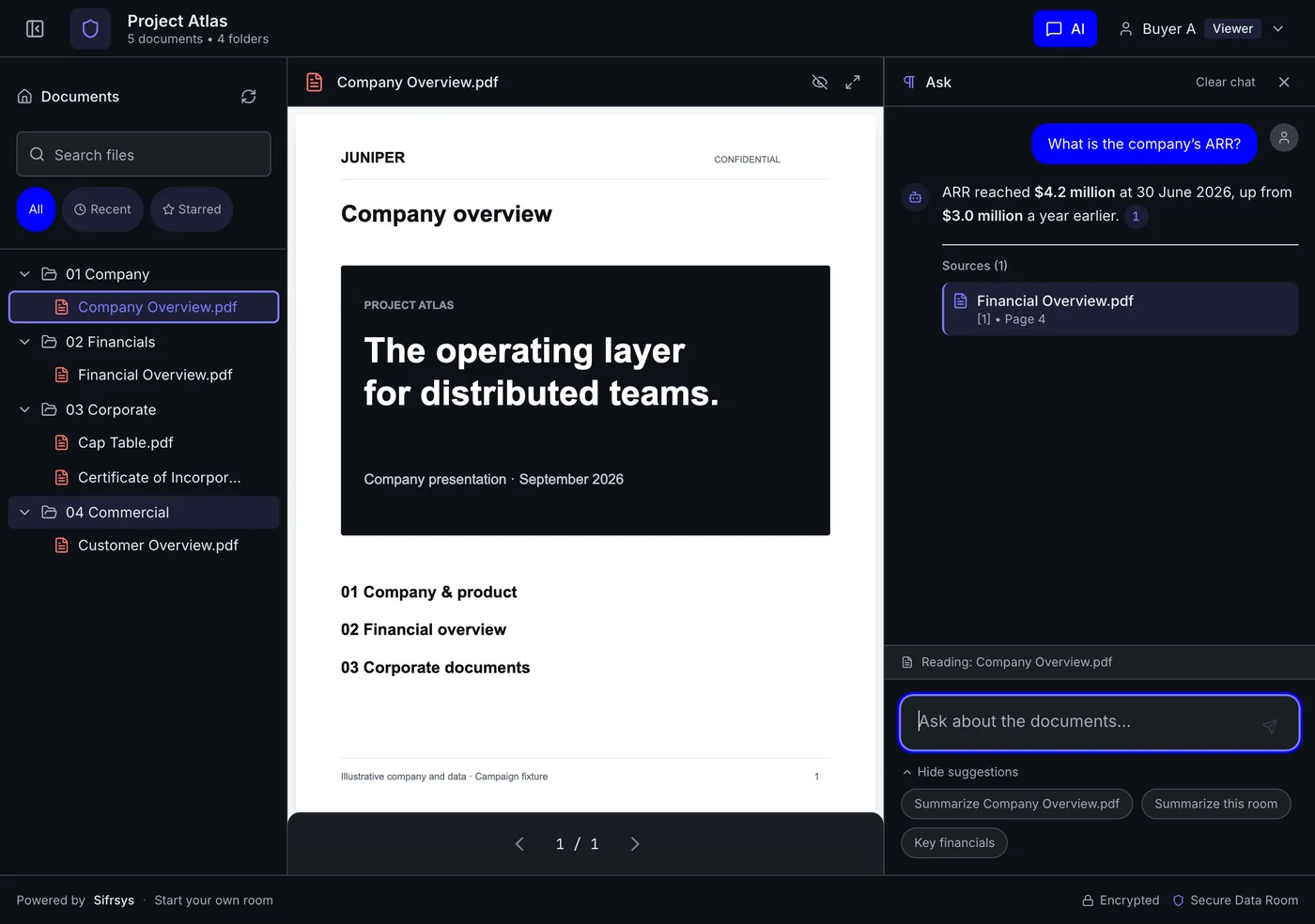
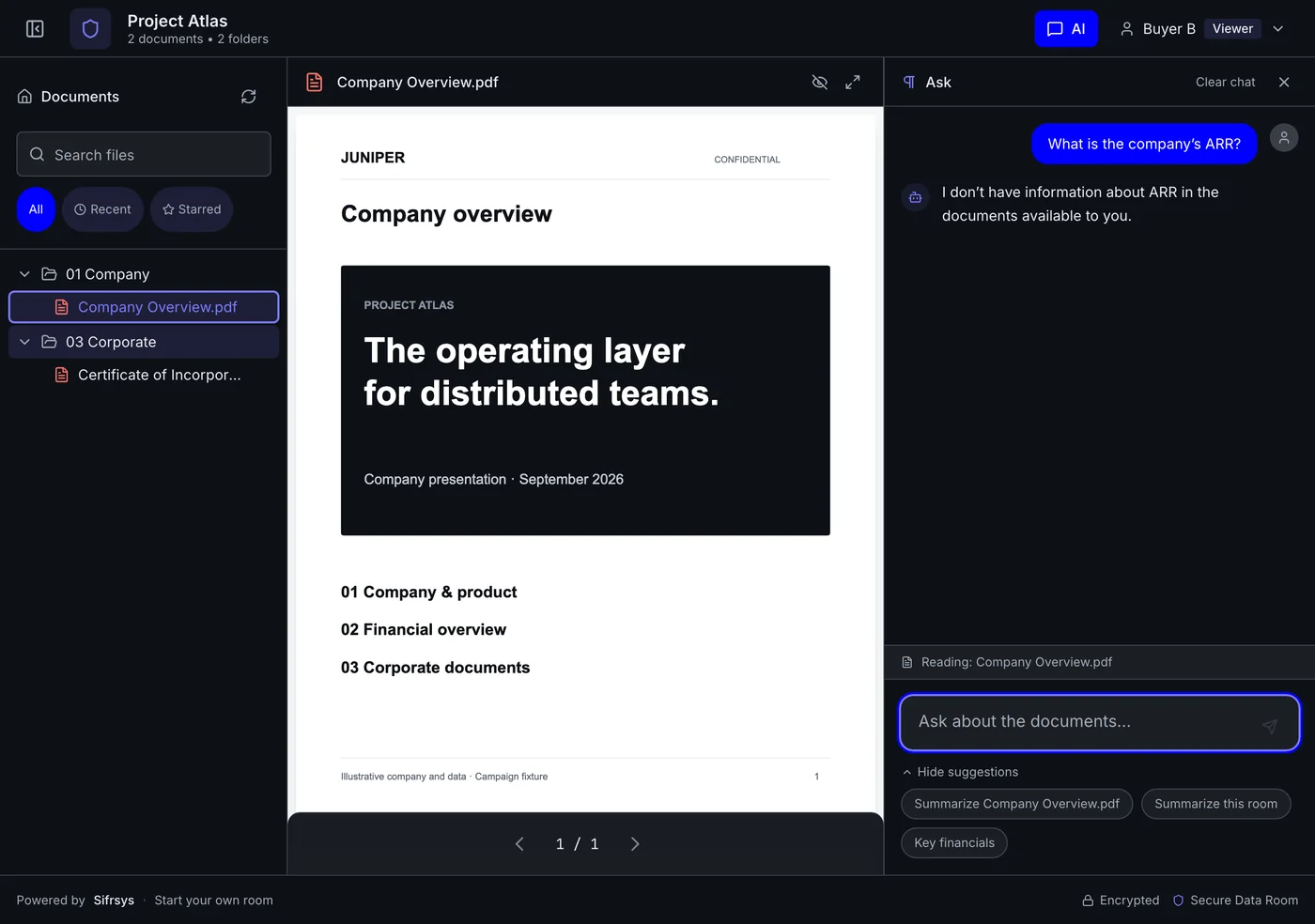
The captures below are the same question in the same room, asked as two buyers in different groups. Buyer A can open the financial overview, so the answer cites it, page 4. Buyer B cannot, so the assistant says it has no information in the documents available to them. Nothing in Buyer B's answer reveals that a financial overview exists.
The evidence
Where to check it yourself.
Scope
Where this control stops, and what covers the rest.
Other tools
Who else does this job, in their own words.
| Vendor | What they publish | Note |
|---|---|---|
| Papermark: ai permission enforcement | Stated: answers never reach documents a viewer may not see. Mechanism not published | states the property; the mechanism is not published |
| iDeals: ai answers from documents | Premier and Enterprise | AI chat with documents on higher tiers; permission enforcement not published |
| Datasite: ai answers from documents | Blueflame AI search and Q&A drafting | Blueflame AI in the room; permission enforcement not published |
Sources
Every competitor fact on this page, with its URL.
Read from the vendor’s own pricing page or documentation on the date shown. Vendors change these pages. Check the date before you rely on a row.
Questions
Questions about AI and permissions in a data room.
Run the test yourself
Ask one question as two buyers.
Create a free room, put two participants in different groups, give one of them the financials, and ask both the same question.
Free to start · No per-page fees · No credit card required